• Home
  • News
  • Marketing Events
    • Marketing Events Calendar
    • Submit An Event
  • Business Directories
    • Marketing Agencies
    • Advertising Agencies
    • Market Research Agencies
    • Market Research Recruitment
    • Event Management Agencies
    • Public Relations Agencies
    • Marketing Industry Associations
    • Industry Recruitment Agencies
    • Promotional Merchandise Agencies
    • Social Media Marketing Agencies
    • SEO & SEM Agencies
  • Marketing Tools
    • Marketing Plans
    • Marketing Publications
    • Marketing Jobs
    • Calculators
    • Media Research
    • Advertising Facts
  • Advertise
  • Write For Us
  • Subscribe

Marketing.com.au

Marketing news, events and resources

  • General
  • Advertising
  • Content Marketing
  • Market Research
  • Public Relations
  • SEM
  • SEO
  • Social Media
4 Tips to Pull Actionable Insight from Google Search Console

4 Tips to Pull Actionable Insight from Google Search Console

September 28, 2017 By Tom Donohoe

Google Search Console is a very powerful tool for optimising your website. I have found that marketers tend to stick clear of it like the plague and leave it to their IT team.

But this is a mistake. The insights that you can gain can dramatically improve the traffic to your website.

In this guide, I’ll cover 4 powerful insights that you can pull from Google Search Console reports in minutes.

Table Of Contents:

  • What is Google Search Console
  • How To Set Up Google Search Console
  • Tip #1 – Keyword Research
  • Tip #2 – Find page optimisation opportunities
  • Tip #3 – Create new pages
  • Top #4 – CTR optimisation

What Is Google Search Console?

Google Search Console (GSC) is a tool offered by Google free of charge that helps you to monitor and maintain your website performance in search results.

You can use GSC to make sure that Google can access your content, what queries your site is ranking or nearly ranking for, which sites are linking to you and much more.

If you are yet to set up Google Search Console for your business follow the guide below. If you have already that’s great! Skip straight to my 5 tips to gain meaningful insights.

How To Set Up Google Search Console

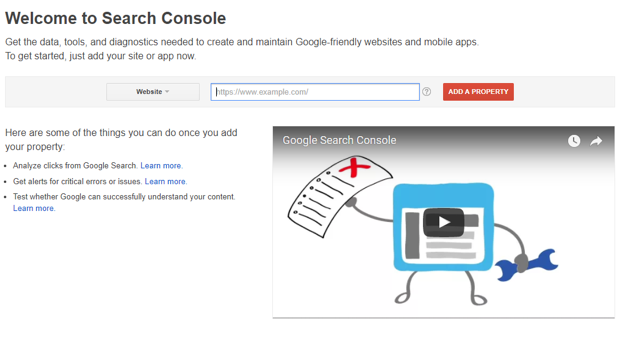
To sign up for GSC, head over to Google Search Console home page. Add your website URL and hit “add property”.

Setting Up Google Search Console

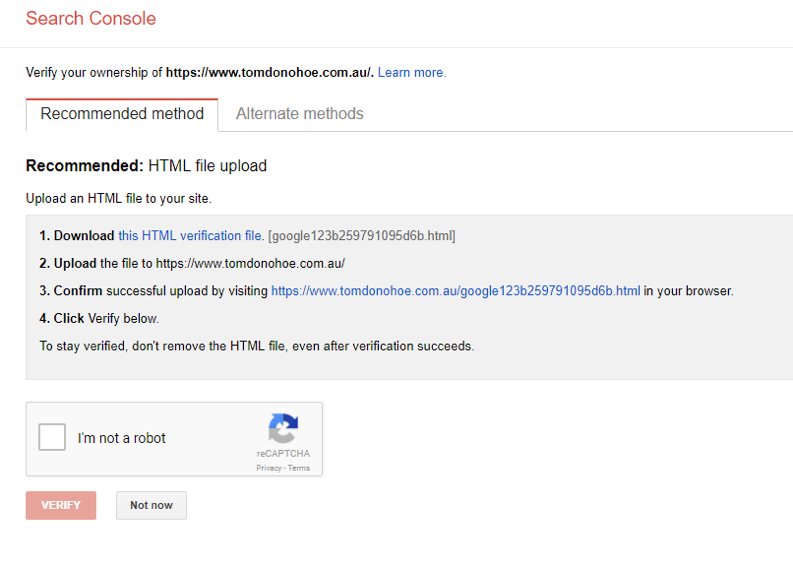
You will then be asked to verify you own the website. You have five (5) options to verify your ownership. If you have access to your website’s file manager, such as FTP or cPanel you can download and upload the HTML verification file to your root domain.

Google Search Console Verification

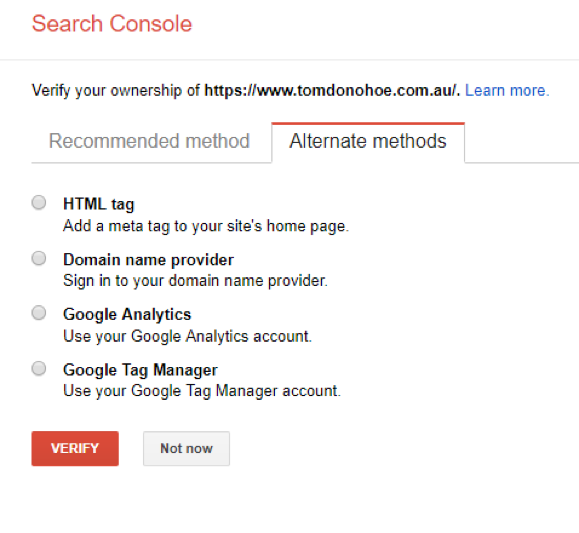
Otherwise you can use one of the alternative verification methods:

Google Search Console Verification Methods

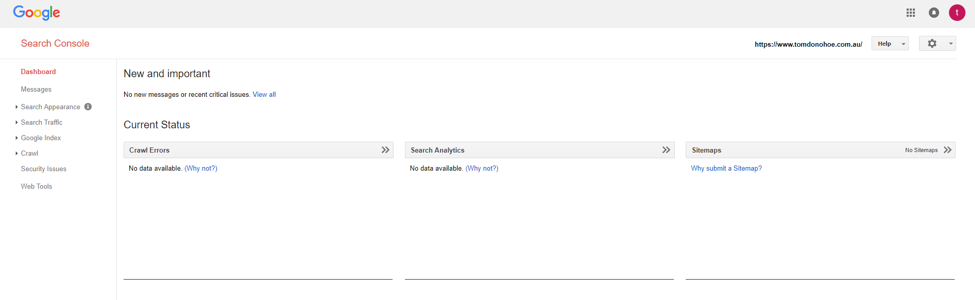
If you successfully verified ownership you should be in the search console dashboard ready to begin gaining insights.

Google Search Console Dashboard

Now you won’t see any data in Google Search Console for a couple of days. But in the meantime you can submit an XML sitemap to help Google understand your website.

Google have a support article on why and how you should do this.

Tip #1 – Keyword Research

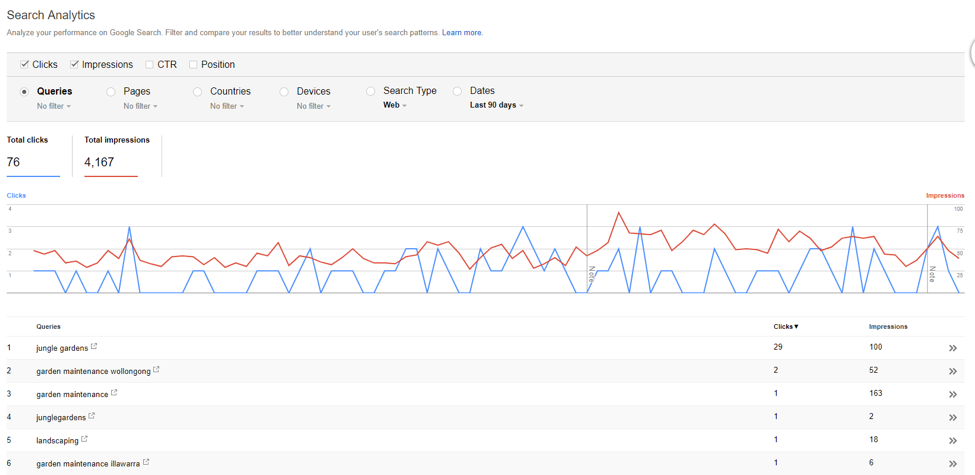
When conducting keyword research more often than not we turn to Google Keyword Planner. I highly recommend you still do this. But you can also find a lot of new keywords in GSC.

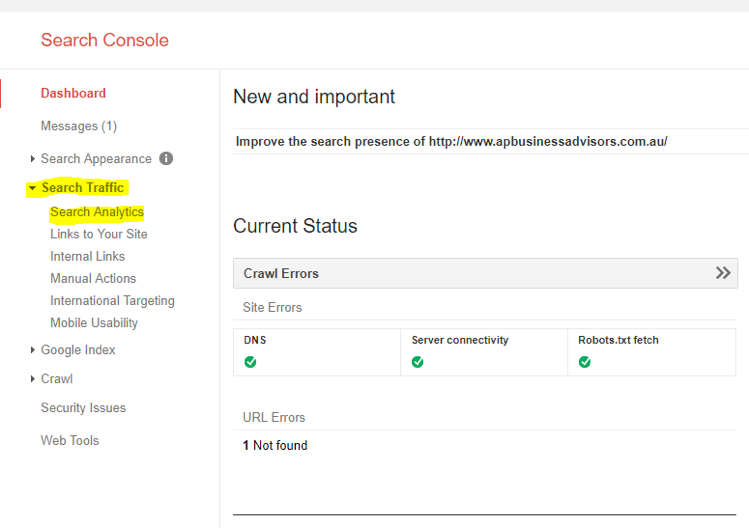
To do this navigate to search traffic tab and then search analytics:

Google Search Console Key Words Research

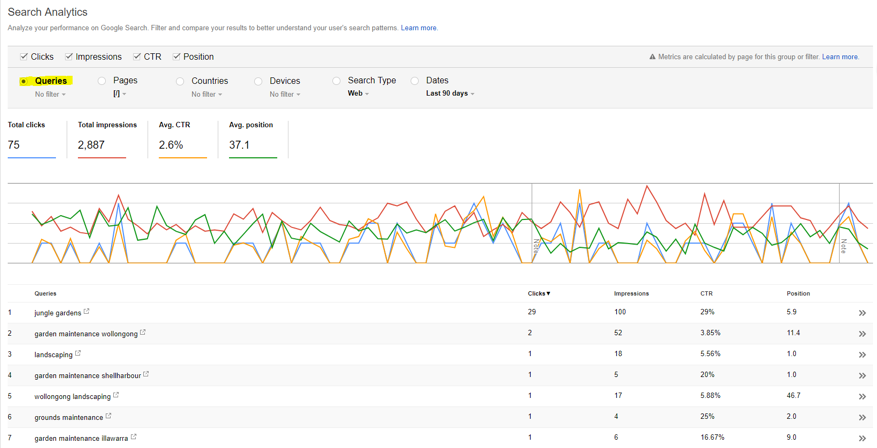
In this report we can see what queries our website is getting impressions from. This is a great way to identify new long tail keyword ideas.

Google Search Console Reporting

What you do with these keyword ideas depends on your SEO strategy but in my next few tips I will give you some advice.

Tip #2 – Use Data to Optimise Your Ranking Pages

This is a very simple yet, powerful optimisation that you can get from GSC.

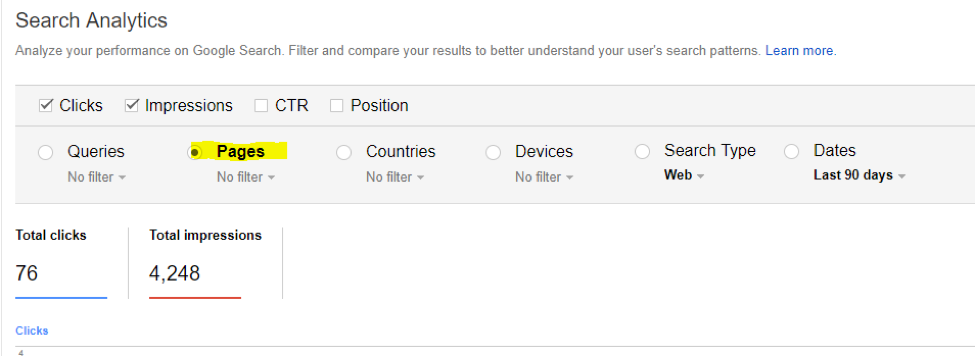
Click on pages:

Google Search Console Pages reports

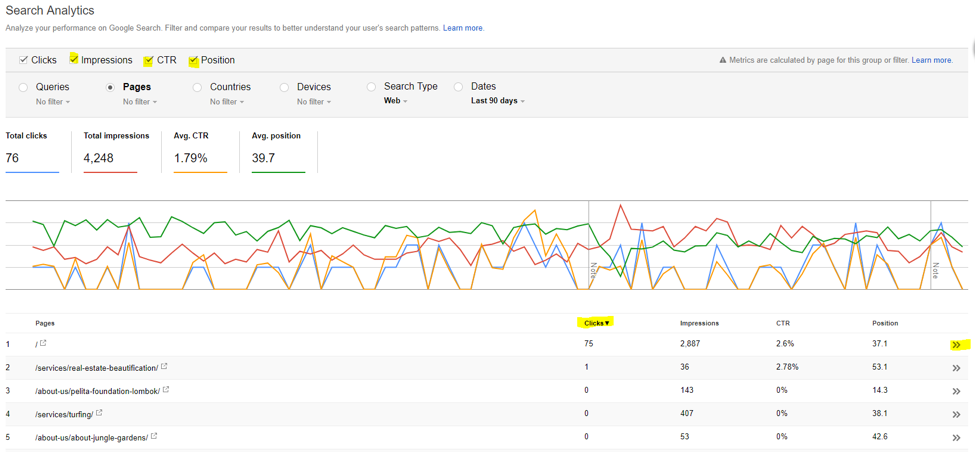
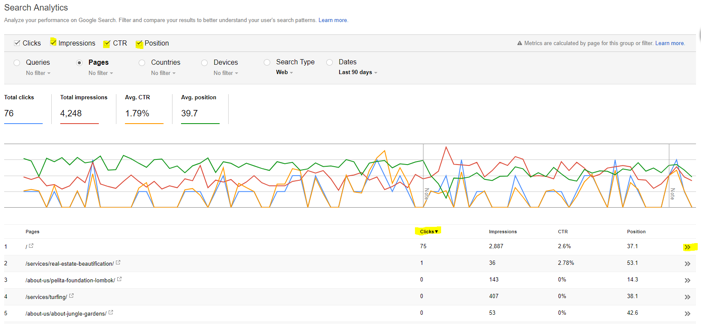
Then tick impressions, ctr and position. Filter by clicks. Pick out your top page. And click the >>.

Google Search Console Additional Reporting

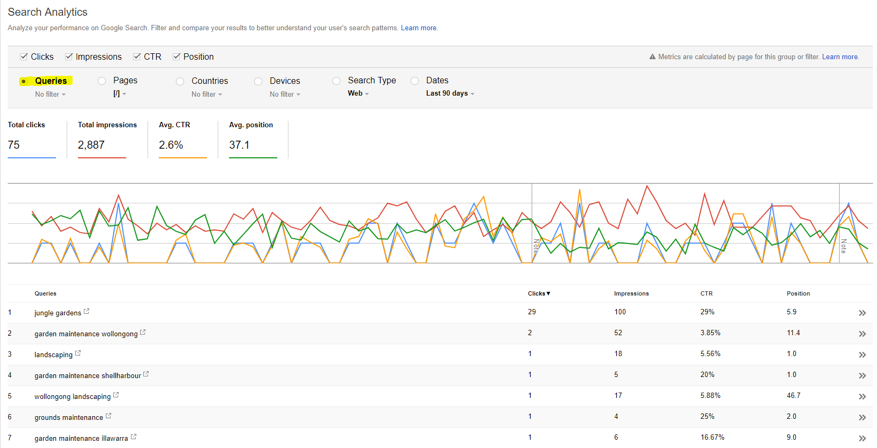
Once you filter by your top page, you will want to filter by queries. Then you will see all the queries that your top page ranks for or nearly ranks for.

Google Search Console Queries

Actionable Advice:

  1. Identify the queries that have the most impressions and that are most relevant to your business.
  2. Look at your pages on-page SEO elements. Does your page title and H1 include these keywords? Are they included in the meta description? Are they mentioned throughout the web pages copy?
  3. If not, make these optimisations.

You can rinse and repeat this same process but for pages that have a lot of impressions but are not ranking on the first 2-3 pages of Google.

Tip #3 – Create New Pages

When optimising a web page it’s best practice to keep the theme of your page very tight. Usually, only optimising the page for 1-3 keywords.

Again navigate to traffic tab and then search analytics. Select a page and filter queries:

Google Search Console Analytics

Actionable Advice:

  1. This time you want to look for queries that the page is ranking for that aren’t particularly relevant to the page.
  2. Take these queries and create new pages tailored specially to them.
  3. Make sure the content is unique and super relevant to your keyword.

Top #4 – CTR Optimisation

Finally, if you are writing blogs frequently this is a great tactic but it can also be useful for other web pages.

You can to filter by pages and clicks. Look for pages that have below your average CTR. Once you have identified these pages make a note of them.

Google Search Console CTR optimisation

Actionable Advice:

  1. Now you have a list of pages with low CTR, investigate why?
  2. Google search the keyword the page ranks for. Look at the other results. Are their meta description more compelling? Test a new meta description but with a stronger call to action or value proposition.
  3. If you can get as little as a 5% lift in CTR this can dramatically increase your organic traffic.

Next Steps

These 4 tips are very simple and easy to test. But there are many ways you can use Google Search Console to improve your organic rankings.

Experiment with the tool and use it to monitor your rankings. Constantly look for trends and opportunities in the data. And most of all take action!

If you’re looking for more helpful info on using Google’s suite of tools check out these other articles from Marketing.com.au:

  • 6 Common Mistakes To Avoid with Google AdWords Campaigns
  • Four Strategies SEO Agencies Use To Supercharge Google My Business
  • Google AdWords: The Benefits Ad Extensions
  • 6 Things You Need to Know About Google Tag Manager
  • How to Use Google AdSense
  • Google AdWords: How to Write a Compelling AdWords Advert
  • Google AdWords: How to Ensure Your Advert Has a High Quality Score
  • Google AdWords: How to Set Up a Campaign in 10 Simple Steps
  • About
  • Latest Posts
Tom Donohoe

Tom Donohoe

Digital Marketing Specialist at Tom Donohoe Consulting
I do fun stuff with SEO, paid search and analytics at Tom Donohoe Consulting. In my spare time, I’m an evangelist of all things digital, tech geek and frequent blog contributor. Connect with me on LinkedIn and Twitter.
Tom Donohoe

Latest posts by Tom Donohoe (see all)

  • A Beginners Guide To An SEO Audit - April 5, 2018
  • 4 Tips to Pull Actionable Insight from Google Search Console - September 28, 2017
  • The Definitive Content Marketing Checklist to Drive Leads - August 31, 2017

Other Related Marketing.com.au Articles:

  • How To Ensure Your Content Marketing Strategy Has ROI
    On-Page 2026 SEO: The 90-Day Authority Blueprint
  • How to Maximise Your Social Media Ads Budget
    How to Maximise Your Social Media Ads Budget
  • SEO on-page optimisation for websites
    How To Build An SEO Strategy That Actually Works In 2025
  • How to Use Google Search Console in 2023
    How to Use Google Search Console in 2023
  • Complete Guide To Google Disavow Tool
    How To Avoid The Biggest SEO Mistakes
  • Utilising Customer Reviews to Enhance Your SEO
    How To Get More Google Business Reviews
  • Popular SEO strategies being utilised in 2018
    What Is The "Helpful Content" Update According To Google?
  • Top Seven Tips to Boost Your AdWords Campaign
    How To Run A Successful PPC Campaign On A Limited Budget

Filed Under: Advertising, Content Marketing, General, Latest News, SEM, SEO Tagged With: click through rate, clicks, content, ctr, Google Search Console, Google Webmasters, impressions, keyword research, optimisation, position, reporting, verification

Recent Posts

  • Marketing Events – December 2025
  • Why Top Brands Are Ditching Live Action for Animated Ads and Getting Better Results
  • How To Build An SEO Strategy That Actually Works In 2025
  • Marketing Events – November 2025
  • Why Competitor Analysis Is Critical For E-Commerce Success

Join Our Newsletter

For free updates on upcoming Australian events, articles and resources.

CONNECT WITH US

  • Facebook
  • Twitter

MAIN MENU

  • Advertise with Us
  • Write For Us
  • Submit An Event
  • List Your Business
  • Marketing Events
  • Business Directories
  • About Us
  • Contact Us

SEARCH BY CATEGORY

  • Advertising
  • Content Marketing
  • General
  • Market Research
  • Public Relations
  • Search Engine Marketing (SEM)
  • Search Engine Optimisation (SEO)
  • Social Media

Join Our Newsletter

For free updates on upcoming Australian events, articles and resources.

Copyright © 2025 Marketing.com.au · Terms & Conditions · Privacy Policy

  • Home
  • News
  • Marketing Events
    ▼
    • Marketing Events Calendar
    • Submit An Event
  • Business Directories
    ▼
    • Marketing Agencies
    • Advertising Agencies
    • Market Research Agencies
    • Market Research Recruitment
    • Event Management Agencies
    • Public Relations Agencies
    • Marketing Industry Associations
    • Industry Recruitment Agencies
    • Promotional Merchandise Agencies
    • Social Media Marketing Agencies
    • SEO & SEM Agencies
  • Marketing Tools
    ▼
    • Marketing Plans
    • Marketing Publications
    • Marketing Jobs
    • Calculators
    • Media Research
    • Advertising Facts
  • Advertise
  • Write For Us
  • Subscribe